
Asset UPnP
Asset is a UPnP (DLNA compatible) audio server, designed as an audio only server, with an emphasis on quality and enhanced music browsing abilities. UPnP is a method of sharing media content between devices using your network. Audio files are stored on a computer, server or NAS, Asset runs on said computer or NAS and multiple audio devices around the home network can play audio from the UPnP server. Devices such as Wiim players, Linn Digital Streamers, Naim Streamers.
Asset features:
When compared to other UPnP servers, it is surprising how simple things are just plain wrong, such collating albums with the same name as one huge album, after all you could have ten Greatest Hits albums. With Asset UPnP the attention to detail is second to none.
- Designed from the ground up as an audio only UPnP server,
- Internet Radio: browse popular stations from around the world,
- Dynamic playlists: find newest, least or most played tracks & albums. Jukebox (random) selection,
- Dynamic Browsing, include / Exclude Genres, or Years with ease,
- Customisable browse tree with advanced search facilities (Album by Release, Style, Composer, Conductor...),
- Configurable Wave, LPCM or mp3 decoding (no quality loss) for devices which cannot play specific audio types,
- DSD and DFF compatibility, decode, send untouched or DSD DoP embed,
- Capture the PC sound output and stream to a UPnP player (Windows only),
- ReplayGain can be applied to Wave, LPCM and mp3 stream, volume matching across tracks for devices which have no support,
- Runs efficiently in the background detecting new & changed tracks,
- Asset Collections: create add additional asset instances, each with different audio libraries
Installation and Platform Specifics
Depending on which platform Asset is to be installed on:
Quick Start
After installation Asset is running and indexes your default music folder, see the specific platform install links above for details on which folder is indexed by default.
It can take a few minutes to scan the tracks and add them to the library, depending on number of tracks. The Music folder is watched for changes and updates automatically, this depends on platform support.
Asset is accessed directly from the device or through a UPnP Control Point which might be on a phone, or tablet.
Asset will appear on your UPnP control point as Asset UPnP: [Computer Name], select Asset to browse for audio tracks:
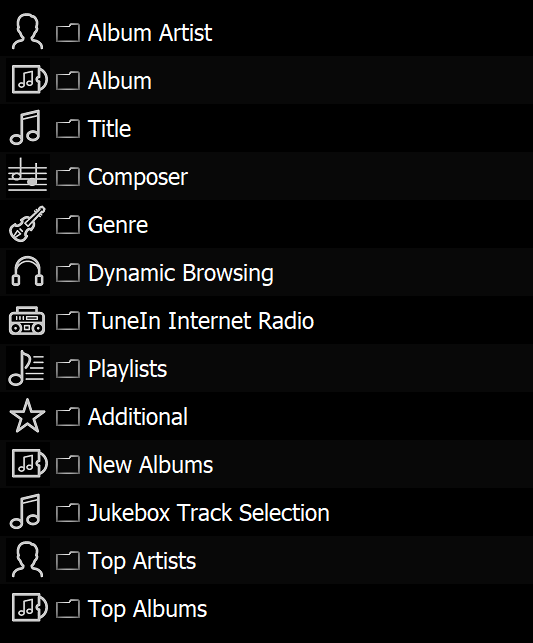
This is the browse tree, where Asset assists in finding audio to play through the various menus.
Browse Tree
The browse tree offers different views of browsing your music:
Album Artist >> Album >> [Tracks in Album Order]
The main path for choosing music, based on an artist and album selection. Note by default, if your tracks do not have an album artist tag, it will be filled by the artist tag. If wanting to choose all tracks for a given artist, see Dynamic Browsing.
Album >> [Tracks in Album Order]
Find albums based on album name, as with the previous the tracks are presented in album order based on track number tag.
Title >> [All Tracks in Alphabetic Order]
Lists all tracks after an A-Z selection, depending on collection size, this view could list 10's of thousands of tracks.
Composer / Genre >> [Continue Selection of Album / Artist / Year / etc]
Select composer, or genre, then continue refining with for example album.
Dynamic Browsing
Dynamic is the powerhouse of Asset, offers customising the listing (Artist, Album, Tracks) results based on inclusion or exclusion principles. The easiest way to describe is through example, imagine having a party and you want Music from the 80's and 90's, however want to exclude the Genre Classical and Genre Soundtrack. The choices would be:
Dynamic Browsing >> Year >> 1980's >> Year >> 1990's
>> [Exclude] >> Classical >> [Exclude] >> Genre >>
Soundtrack.
Finally [List Albums] is selected, or [JukeBox Album Selection] for a random selection of albums.
Internet Radio
Browses the online world of Internet radio, based on location.
Playlists
A folder of .m3u playlists can be specified in the configuration, this option would present those playlists.
Additional
Contains a subset of useful browse methods:
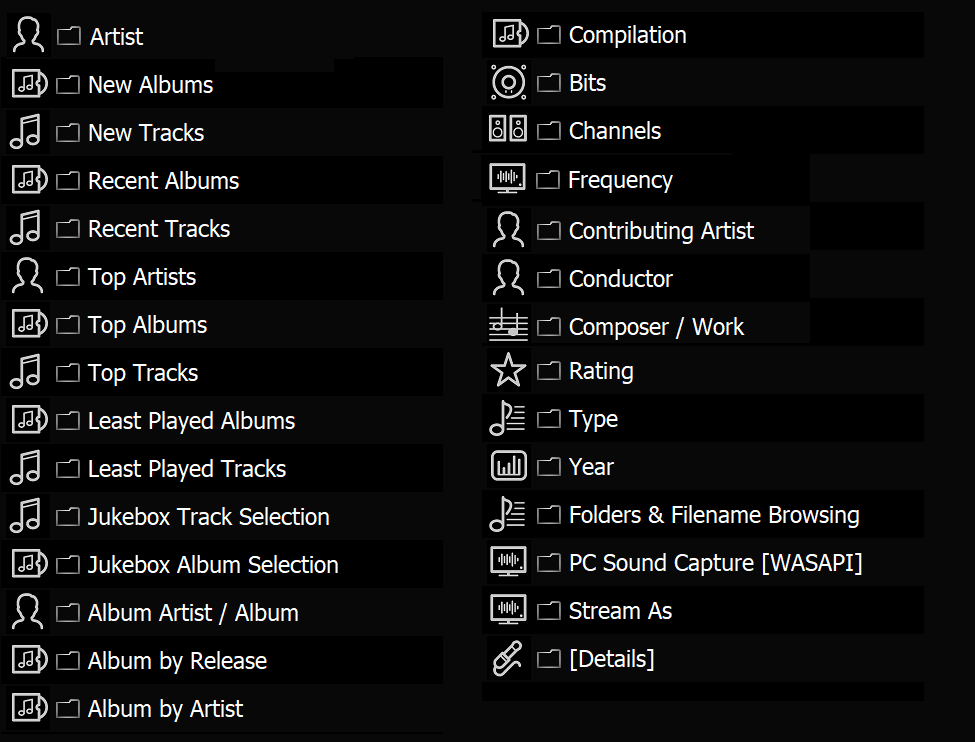
New Albums
Lists latest albums added to the collection.
Jukebox Track Selection
Randomly chooses a bunch of tracks for playing, each time enter the menu a different set of tracks is presented. Can be combined with Dynamic Browsing to selectively choose type of tracks played.
Top Artists / Albums
Lists the most popular artists or albums, based on the number of times tracks have been played from said artist or album.
Finally [List Albums] is selected, or [JukeBox Album Selection] for a random selection of albums.
Artist is slightly different to Album Artist in the main menu, in that it will list tracks where said artist was contributing on the track. It also allows further selection after choosing, by returning to the root menu, for example can choose Artist, then Additional >> Album by Release.
New Albums / Tracks lists based on recently added to the collection, as opposed to year of release.
Recent Albums / Tracks lists the last played items.
Top... lists based on most played.
Jukebox Track / Album Selection will randomly choose based on the selection, for example: Additional >> Artist >> Jukebox Track Selection to get a random choice of tracks from an artist.
Album by Release presents a discography based on year, best when narrowed down first, for example: Additional >> Artist >> Album by Release.
Compilation removes non-compilation items from the choice.
Bits / Channels / Frequency enables selection based on bit depth (16, 24, 32 etc) or channel count of the source music.
Contributing Artist lists items where the artist is a contributing artist (not the main artist).
Conductor / Composer / Work is one for those with classical items, Composer and Work rely on iTunes style tagging of those items.
Rating uses the rating ID Tag.
Type splits out by audio file format, such as mp3, or FLAC.
Folder & Filename Browsing browses exactly as the files appear on the disk, not using ID Tags.
PC Sound Capture is available on Windows only, if supported, and allows the default sound output device to be streamed over UPnP.
Stream As allows to choose if the audio is transcoded, for example if want to play over wifi and the connection is not great, then choose Stream As mp3.
Details lists information about Asset, such as version, registration status and track / album count.
Copyright © illustrate 2026, All Rights Reserved