TuneFUSION { Help Index > Windows Media Audio Codec }
Windows Media Audio encompasses multiple codecs into one:
Windows Media Audio 9.2 Lossless
Windows Media Audio 9.2 (a lossy codec)
Windows Media Audio 10 Professional (lossy higher quality than 9.2)
Windows Media Audio 9 Voice
ACLEP.net (low bit rate, voice optimized)
dBpoweramp is able to read all versions of WMA (except protected WMA files) and encode to the aforementioned codecs.
For macOS WMA support is limited to decoding of WMA, not encoding.
Versions
Different versions of WMA are confusing to say the least, not least because they do not go up in consecutive version numbers. Windows Media Audio v2 was the first, then v4, v7, v8, v9, v9.1 (and v9 PRO), v9.2 and v10 PRO.
Windows Media Audio 9.2 (not voice, lossless or professional) is backwards compatible with all playback devices. Newer lossless, voice and professional require new decoders (very few portable players will play these).
Compression Options
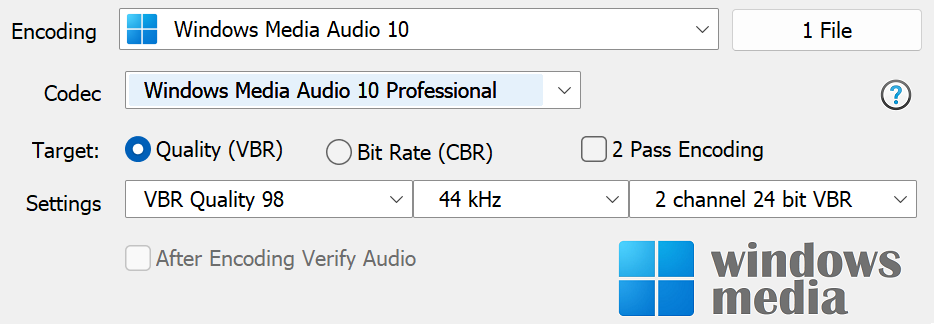
Codec chooses the Windows Media Audio codec type:
Windows Media Audio 9.2 Losslesscompresses audio without loosing quality (think Zip for audio), compression will be around 50% (or 2:1).
Windows Media Audio 9.2 is the standard WMA codec, should play in any audio player,
Windows Media Audio 10 Professional of a higher quality than 9.2 and allows 5.1 channels and 24 bit, limited player support,
Windows Media Audio 9 Voice & ACLEP.net both optimized for low bitrates and voice encoding.
Target sets either Variable bit rate (VBR) or Constant bit rate (CBR) encoding, codec permitting. VBR should be chosen over CBR as for same size files it will yield a higher quality.
2 Pass Encoding can be selected for certain codecs, encoding is done in two passes allowing for a higher quality encoding.
After Encoding Verify Audio can be chosen only with lossless, once compression is complete the compressed audio will be read and compared to the source, verifying the compression is without error (hard disk, or very unlikely codec induced).
Codec Background
Microsoft's own audio codec to compete with mp3.
ID Tag Details
Windows Media Audio have their own tagging format, able to store fields of any name, length and embeddable album art. Fully Unicode compatible.
Terminology
Encoding: compress and write audio track, Decoding: uncompress and read the track, ID Tags: meta data such as artist & album are embedded inside the audio file, Lossless: compression without audio quality loss, Lossy: audio quality is sacrificed (how much depends on bitrate and codec used) to achieve smaller files, Gapless: allows the decoder to decode audio stream without gaps (silence).