
 | Matroska Encoder |
- H264, also known as MPEG-4 Part 10, or Advanced Video Coding (MPEG-4 AVC), is one of the most commonly used video formats, universal support,
- H265, also known as High Efficiency Coding (HEVC), MPEG-H Part 2. Typically is half of the filesize for same quality as h264,
- H266 (VVC) is the latest mpeg encoder, although playback support is limited,
- AV1 is the successor to vp9 and offers compression on a par with h266
- VP9 is a royalty free codec, AV1 should be chosen in its place.
- FFV1, archival lossless video codec,
- [copy no encode] can be used if the video is already in a compatible format and it is copied 1:1 over, saving re-encoding.
Compression Options
Being a container many encoding options are present for Matroska: H264, HVEC H265 and VP9, as well as the option to copy 1:1 (re-mux) an existing format (such as h264 in a .mp4 file) which copies video and audio without encoding.
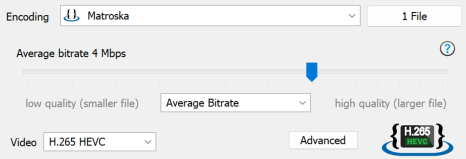
A quality slider chooses encoding quality, or bit rate, a drop combo below the slider offers 4 types of encoding (depending on encoder chosen):
Advanced options page offers Tuning for specific video types.
GPU Encoding
In addition to software encoders, there is the choice of using a GPU encoder (should a compatible graphics card be installed), with selections for Nvidia, Intel QSV and AMD.
Hardware encoders typically will have less options, and have less quality than a software encoder, however they encode many times faster.
If using a GPU encoder, combine with the DSP effect 'GPU Accelerated Decoding'.
Audio
A multitude of audio formats are available to be chosen, with the option also to copy 1:1 from source if the audio is already in a correct format.
If re-encoding audio, on the advanced page is an option to normalize volume.
- Constant Bit Rate a fixed bit rate is used through out encoding,
- Average Bit Rate like Constant Bit Rate except there is some encoding flexibility, for difficult parts a higher bit rate is used, overall though the bit rate averages out to the requested value,
- Constant Quality a desired quality is achieved throughout the encoding process, by varying bit rate, this is the recommended mode for most people.
- Lossless encodes video without loss of quality, expect end files to be large, test to ensure compatibility with various players.