dBpoweramp Music Converter { Help Index > Wave Codec }
Wave is a container format, that is it can contain many types of audio. Most common is uncompressed (PCM), in addition compressed audio can be stored using one of the many ACM codecs.
Supported by this Codec:
Encoding: Yes [.wav]
Decoding: Yes [.wav, .wave]
ID Tag: [Wave LIST & ID3 Tags]
Unicode Tagging: Yes with ID3
Supports Album Art: Yes with ID3
Gapless Encoding & Decoding: Yes
Compression Options
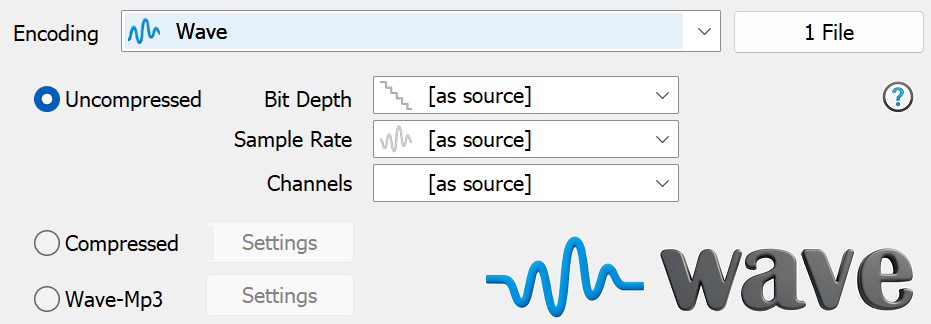
Uncompressed creates a standard PCM wave file, uncompressed is much larger than mp3 (10x) and larger than lossless files (2x). Setting bits, channels and frequency to [as source] ensures the wave file matches the quality of the source.
Compressed, click Settings to choose from installed ACM codecs.
Wave-Mp3, creates a mp3 compressed wave file, using the Lame mp3 encoder.
Codec Background
Wave was developed by Microsoft and IBM, using the RIFF 'chunk' container format. Majority of Wave files are uncompressed PCM, however can also store compressed audio (requires a system ACM codecs to decode).
ID Tag Details
Wave files can store a limited choice of fields in a Wave LIST chunk, or the full range id ID Tags in an 'id3 ' chunk (which is an id3v2 tag).
By default both types of tags are written for maximum compatibility. Not all programs can read these chunks.
Advanced Options
dBpoweramp Control Center offers advanced options for this codec (dBpoweramp Control Center >> Audio Codecs 'List / Options'):
Wave ID Tagging
This section allows for configuration of LIST tags, to set optimum compatibility with decoding program. Padding can be used so that when ID Tags are edited the whole file does not need rewriting.
Wave Encoder
Write Extensible Header: Microsoft introduced an extended wave header called Extensible, the idea is to offer more fields for high definition audio. The only fly-in-the-ointment is compatibility of programs and the extensible header. This option can switch to never write an extensible header.
Command Line
dBpoweramp (Windows) allows compressions from the command-line, commands specific to this codec:
Encoding: compress and write audio track, Decoding: uncompress and read the track, ID Tags: meta data such as artist & album are embedded inside the audio file, Lossless: compression without audio quality loss, Lossy: audio quality is sacrificed (how much depends on bitrate and codec used) to achieve smaller files, Gapless: allows the decoder to decode audio stream without gaps (silence).