
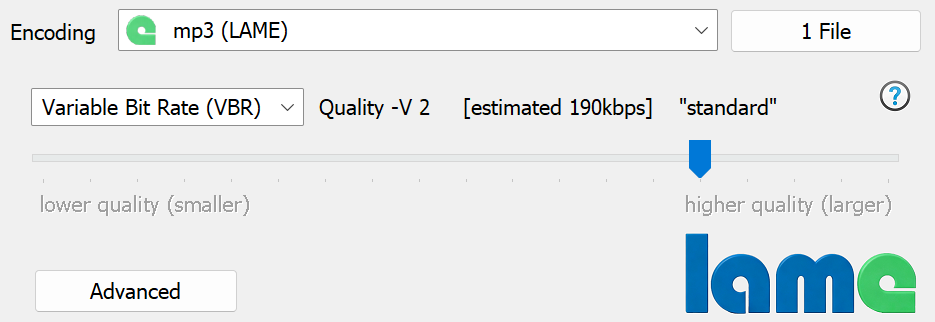
Lame offers 4 types of encoding:
Clicking Advanced:
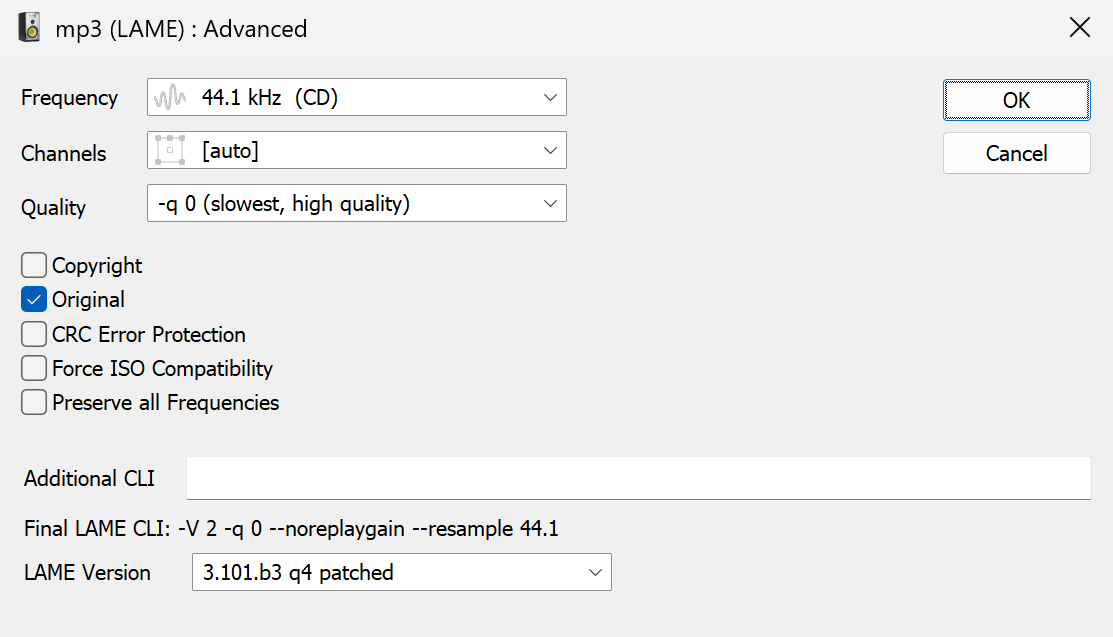
Frequency - number of samples per second to be encoded, [as source] allows the output frequency to match the input frequency (recommended).
Channels:
[auto] matches the channels to the source, for 2 channels Joint Stereo is used.
Mono a recording with only a single channel of information.
Joint Stereo - luckily for stereo compression sound on the left channel is very similar to sound on the right channel, Joint Stereo takes advantage of this similarity to use the savings on the 2nd channel to give higher quality compression.
Forced Joint Stereo - forces separate encoding of left and right channels, only recommended when high bitrates are used.
Quality specifies how much effort goes into compression, this mode is applicable to all types of encoding.
Copyright marks the MP3 file as containing copyright material.
Original marks the MP3 file as an original file (not a copy).
CRC Error Protection adds a checksum to each frame, a decoder is able to verify each frame has not corrupted, however very few decoders use checksums.
Force ISO Compatibility should be used if your player is having trouble playing MP3 files created by Lame.
Preserve all frequencies normally lame will reduce the upper frequency if the bitrate is below 300kbps, this allocates bit rate to the parts you can hear. This option forces lame to preserve all frequencies.
LAME Version allows selection of a specific version of LAME
LAME is open source developed under the LGPL, the name is an acronym for Lame Ain't an MP3 Encoder in terms of quality, LAME is the top MP3 encoder.
Further details: [https://lame.sourceforge.net]
MP3 files can store 3 different ID Tag types: ID3v2, APEv2 and ID3v1 (old standard):
ID3v2 (recommended and default) able to store fields of any name and any length, Unicode compatible, can store album art & ratings.
APEv2 able to store fields of any name and any length, fully Unicode compatible. APEv2 Tags can store album art. Limited player support.
ID3v1 limited to fixed fields of around 30 characters each: Artist, Album, Title, Comment and special numerical fields: Track Number, Genre, Year. ID3v1 tags are not Unicode compatible.
dBpoweramp Configuration offers advanced options for this codec (dBpoweramp Control Center >> Audio Codecs 'List / Options'):
MP3 ID Tagging
Tag Creation determines which ID tag is used for newly created files.
ID3v1 Version if v1 tags are being written, this option switches between the 1.1 standard (with track number) and 1.0
ID3v2 Text Encoding if your player supports Unicode then UTF-16 can be used to save international tags
MP3 Decoder
Output 16 bit to 32 bit float gives the option to select the output from the decoder, 32 bit float is automatically selected when an encoder can use the higher resolution. MP3 stores internally encodings as floating point, but generally speaking encoding a 16 bit audio CD to MP3 then back to 32 bit floating point wave will not yield extra bit depth.
CRC Errors gives the option to ignore errors in the decoded stream, report as information or report as errors.
dBpoweramp (Windows) allows compressions from the command-line, commands specific to this codec:
-V 4 quality (VBR) based encoding (default -V 4 if not supplied)
-b 128 constant bitrate (or ABR if --abr is supplied)
--freeformat write freeformat MP3 (use with -b 320 to -b 640)
-encoding="SLOW" "NORMAL" "FAST" (none supplied uses NORMAL)
-freq="44100" (none supplied uses [as source])
-channels="mono" "stereo" "joint stereo" "forced joint stereo" "dual channels" (non supplied uses [auto])
-copyright_bit="1" "0" (none supplied uses "0")
-original_bit="1" "0" (none supplied uses "1")
-crc="1" "0" (none supplied uses "0")
-force_iso="1" "0" (none supplied uses "0")
Example: "c:\program files\illustrate\dBpoweramp\coreconverter.exe" -infile="c:\afile.wav" -outfile="c:\outfile.mp3" -convert_to="mp3 (Lame)" -V 2
Copyright © illustrate 2026, All Rights Reserved