dBpoweramp Music Converter { Help Index > WavPack Codec }
WavPack is unique, offering Lossless, Lossy and both Lossless & Lossy compression. How can a file be both Lossless & Lossy at the same time? two files are written a .wv and .wvc, when kept together the resulting audio is decoded as
Lossless, when the .wvc is taken away the .wv decodes as Lossy.
WavPack's Lossy compressor works best at high bitrates (higher than 320kbps), top of its class when compared to Ogg Vorbis, mp3, WMA and AAC/ m4a.
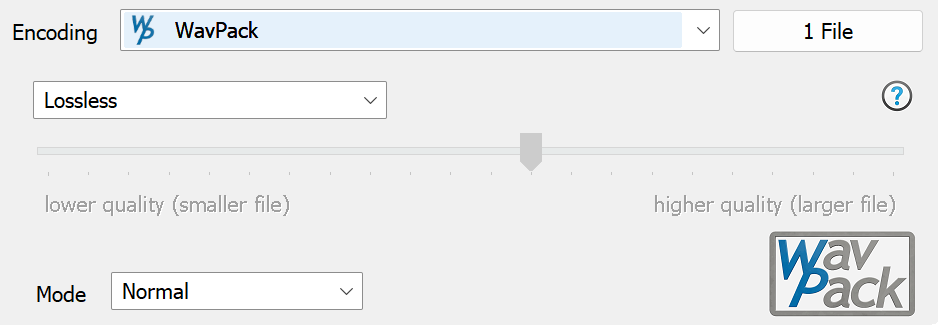
Three encoding modes can be selected at the top, when Lossless is selected no bitrate needs to be specified.
Mode changes the effort which goes into compressing (in with Lossless encodings the decoded audio is exactly the same, regardless which mode is selected).
A MD5 hash is always embedded with in WavPack created from the source audio data.
DSD Compressed in WavPack
WavPack is able to store DSD, if already have .dsf files, open dBpoweramp Control Center >> Codec options
Set DSD Processing to Embed as DoP
Encode the WavPack file then if hold the cursor over it, it should say Lossless [DSD] Compression to show it is correctly embedded.
Codec Background
Created by David Bryant in mid 1998, WavPack has grown to a fully featured encoder, with strong error detection, album art, ability to embed RIFF chunks, 32 bit float compatible, strong cross-platform support, embeddable CUE sheets and Replay Gain support.
A strong selling point for WavPack is the efficient Lossless compressor, with some of the highest compression rates available and fast decoding speeds.
WavPack supports APEv2 Tags and ID3v1 (very old standard):
APEv2 Tags able to store fields of any name and any length, fully Unicode compatible. APEv2 Tags can store album art.
ID3v1 limited to fixed fields of around 30 characters each: Artist, Album, Title, Comment and special numerical fields: Track Number, Genre, Year. ID3v1 tags are not Unicode compatible.
Advanced Options
dBpoweramp Control Center offers advanced options for this codec (dBpoweramp Control Centre >> Codecs >> Advanced Options):
Corrupt WavPack File give the option to ignore any errors and continue to decode the file (errors will be shown as information at the end).
Command Line
dBpoweramp (Windows) allows compressions from the command-line, commands specific to this codec:
-b="9600" Lossy encoding (specify bitrate), if no -b then lossless
-c For Lossy Encoding create correction lossless file .wvc
-f Fast Encoding
-h High Quality Encoding
-verify Verifies compressed audio (by reading back from hard disk, lossless only)
Encoding: compress and write audio track, Decoding: uncompress and read the track, ID Tags: meta data such as artist & album are embedded inside the audio file, Lossless: compression without audio quality loss, Lossy: audio quality is sacrificed (how much depends on bitrate and codec used) to achieve smaller files, Gapless: allows the decoder to decode audio stream without gaps (silence).