dBpoweramp Music Converter { Help Index > Ogg Vorbis Codec }
Ogg Vorbis is a lossy codec, meaning audio quality is lost whilst compressing. How much is lost depends upon bit rate used, higher bit rates will produce audio sounding closer as the original.
Ogg Vorbis is comprised of two parts, Ogg is the container whilst Vorbis is the compression format.
Supported by this Codec
Encoding: Yes [.ogg]
Decoding: Yes [.ogg]
ID Tag Reading: Yes [Vorbis Comments]
ID Tag Writing: Yes [Vorbis Comments]
Unicode Tagging: Yes
Supports Album Art: Yes
Gapless Encoding & Decoding: Yes
Compression Options
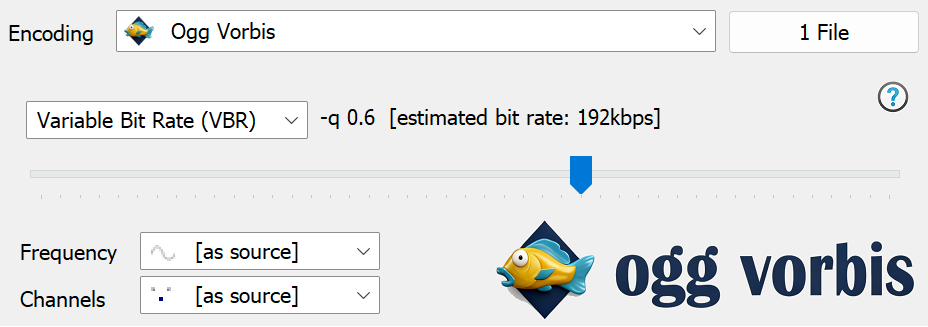
Ogg Vorbis offers 3 types of encoding:
Quality Target Variable Bit Rate (VBR) VBR files are made up from small audio chunks, called frames. Whilst encoding VBR, the encoder decides which bit rate to use for each frame. Bit rates can drop down to lower values when it is warranted (if
there is not much sound complexity) and switch up to a higher bit rate when required. VBR files should be used when encoding unless there is a specific reason not to,
Average Bit Rate (ABR) a little like VBR except constraints are placed on Bit Rate so that over time it averages out to the desired value,
Constant Bit Rate (CBR) a constant bit rate is used throughout the encoding process.
Frequency number of samples per second to be encoded, [as source] allows the output frequency to be set the same as the input frequency (recommended).
Channels:
Stereo two channels of sound, enables instruments to appear separated from one another
Mono a recording with only a single channel of information
[as source] sets the channels to match the input channels (recommended)
Codec Background
Founded by Christopher 'Monty' Montgomery as an alternative to mp3 in 1998, free from patents and open source. Formed into Xiph.ORG foundation. Ogg Vorbis has its own Tagging format and container format.
Ogg Vorbis saves tags using Vorbis Comments, these are present at the beginning of the file and allow Unicode tagging.
Vorbis Comments are not limited to fixed fields, but a lack of standardized extended tag values (such as ratings, etc) limit Vorbis Comments.
Advanced Options
dBpoweramp Control Center offers advanced options for this codec (dBpoweramp Control Centre >> Codecs >> Advanced Options):
Ogg Vorbis ID Tagging
Force Uppercase Elements can be used for with certain devices or programs will only recognise elements (such as Artist) saved as ARTIST.
Vorbis Comment Mapping sadly there are many programs which do not follow the official guidelines for Vorbis Comment tagging (in Vorbis comments 'Label' tag should be stored as 'Organization'), to cater for these programs, mappings can be switched off (so Label would be saved as Label).
Ogg Vorbis Decoding
Output 16 bit (integer) or 32 bit float gives the option to select the output from the decoder, 32 bit float is automatically selected when an encoder can use the higher resolution. Ogg Vorbis stores internally encodings as floating point, but generally speaking encoding a 16 bit audio CD to Ogg Vorbis then back to 32 bit floating point wave will not yield extra bit depth.
Stream Errors gives the option to ignore any errors in the decoded stream, report as information or report as errors.
Command Line
dBpoweramp (Windows) allows compressions from the command-line, commands specific to this codec:
-q="0.6" quality (VBR) based encoding (-0.1 to 1.0) (default -q 0.4 if no command line supplied)
-b="128" Create Variable bit rate file, if --managed is supplied then Constant Bit Rate file created
--resample="44100" Force frequency (none supplied uses [as source])
--downmix Forces mono output (--downmix="2" forces stereo)
Encoding: compress and write audio track, Decoding: uncompress and read the track, ID Tags: meta data such as artist & album are embedded inside the audio file, Lossless: compression without audio quality loss, Lossy: audio quality is sacrificed (how much depends on bitrate and codec used) to achieve smaller files, Gapless: allows the decoder to decode audio stream without gaps (silence).