dBpoweramp Music Converter { Help Index > Cue Sheet Encoding }
Cue Sheets store an extra file (.CUE) along with the audio, which describes the layout of the tracks on the physical CD.
There are two types of cue sheet:
One large audio track and cue sheet tells a player how to split it into separate tracks. To create this type of cue sheet change the encoder in CD ripper to [Cue Single File Encoding],
The second type is individual audio tracks, with a non-compliant cue sheet, to create use the normal encoder (such as FLAC), and include the DSP effect CUE Sheet - Multiple Files.
Compliant CUE Sheet
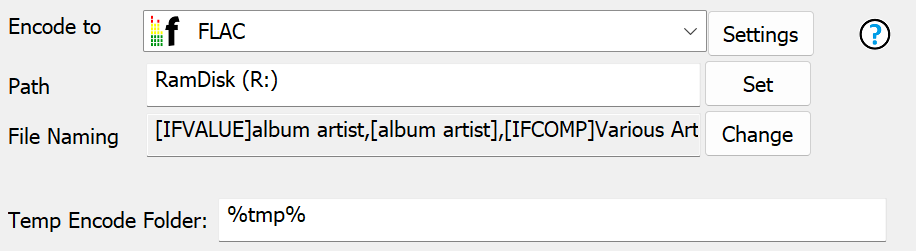
Set the encoder in CD ripper to [Cue Single File Encoding]:
Encode To sets the audio format to be written.
Path and File Naming set where the combined single audio file goes.
The Temp Encode Folder would normally be %tmp% to use the system temporary folder.
The resulting cue sheet will resemble:
REM COMMENT "dBpoweramp" PERFORMER
"Kanye West" TITLE "Watch the Throne" FILE "Kanye West - Watch the
Throne.flac" FLAC TRACK 01 AUDIO TITLE "No
Church in the Wild" PERFORMER "Kanye West; Frank
Ocean; Jay-Z" INDEX 01 00:00:00 TRACK 02
AUDIO TITLE "Lift Off"
PERFORMER "Kanye West; Beyonce; Jay-Z" INDEX 01
04:32:38 TRACK 03 AUDIO TITLE "In Paris"
PERFORMER "Kanye West; Jay-Z" INDEX 01 08:58:57
TRACK 04 AUDIO TITLE "Otis"
PERFORMER "Kanye West; Jay-Z; Otis Redding" INDEX 01
12:38:07
There is an option to write UTF-8 CUE Sheets, in dBpoweramp Control Center >> Audio Codecs 'List / Options'), change the Encoder Option for [Cue Single File Encoding], check first the player supports.
Non-compliant Cue Sheets
Multiple audio tracks are written with a CUE Sheet, which has the best player compatibility. To do so, set the encoder to a normal encoder, such as FLAC (do not use [Cue Single File Encoding]) and include the DSP effect CUE Sheet - Multiple Files.
A file Cuesheet.cue will be created in the same folder as the first file, a typical multiple file CUE Sheet will resemble:
REM COMMENT "dBpoweramp" PERFORMER "Kanye West" TITLE "Watch the Throne"
TRACK 01 AUDIO TITLE "No Church in the Wild"
PERFORMER "Kanye West; Frank Ocean; Jay-Z" FILE "01 Kanye West - No
Church in the Wild.mp3" MP3 INDEX 01 00:00:00
TRACK 02 AUDIO TITLE "Lift Off"
PERFORMER "Kanye West; Beyonce; Jay-Z" FILE "02 Kanye West - Lift
Off.mp3" MP3 INDEX 01 00:00:00 TRACK 03
AUDIO TITLE "In Paris"
PERFORMER "Kanye West; Jay-Z" FILE "03 Kanye West - Ni--as in
Paris.mp3" MP3 INDEX 01 00:00:00 TRACK 04
AUDIO TITLE "Otis" PERFORMER
"Kanye West; Jay-Z; Otis Redding" FILE "04 Kanye West - Otis.mp3" MP3
INDEX 01 00:00:00
Terminology
Encoding: compress and write audio track, Decoding: uncompress and read the track, ID Tags: meta data such as artist & album are embedded inside the audio file, Lossless: compression without audio quality loss, Lossy: audio quality is sacrificed (how much depends on bitrate and codec used) to achieve smaller files, Gapless: allows the decoder to decode audio stream without gaps (silence).